Widgets
Your app, on the home screen.
$ composer require all1web/nativephp-widgets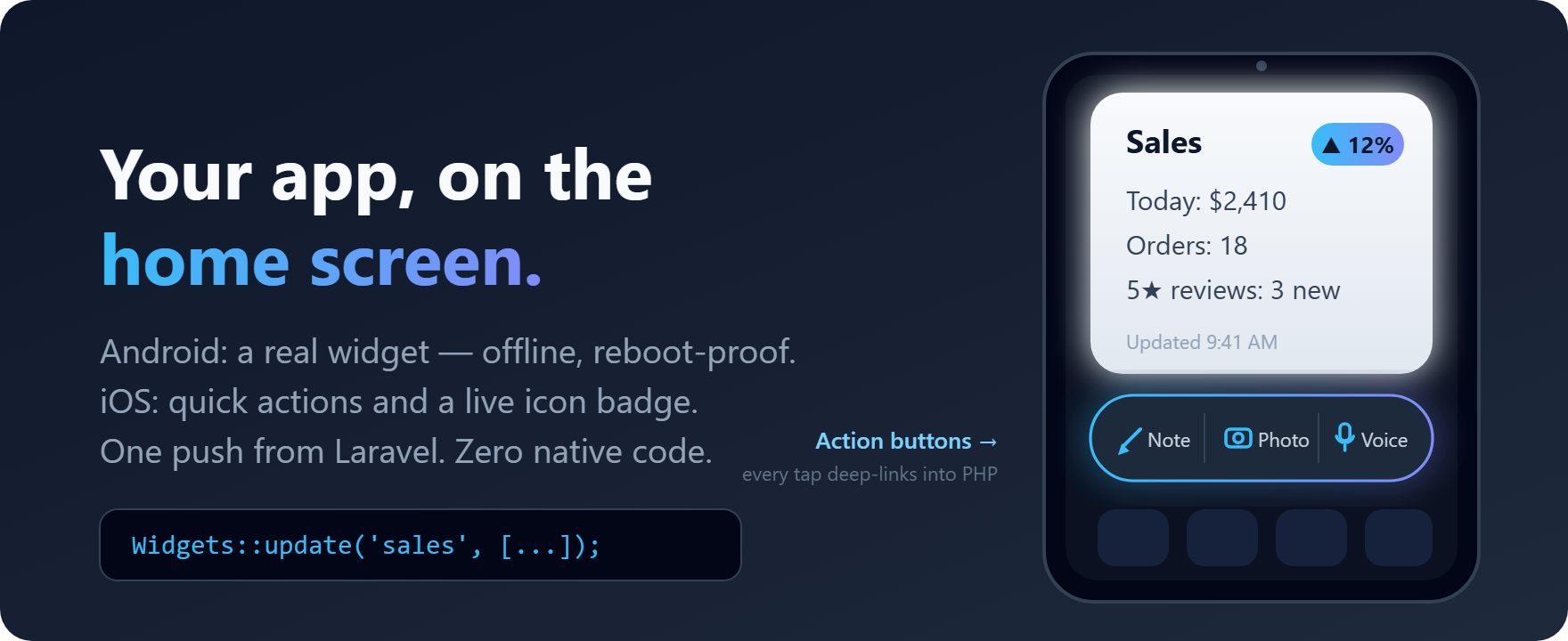
Home-screen widgets driven from PHP: push a payload, the native widget renders it — no fetching, no background PHP.
- Push a payload from Laravel — the native widget repaints itself
- In-app “Add widget” prompt via requestPin(), gated on status()
- First-class testing with Widgets::fake() and assertUpdated()
Documentation
📱 nativephp-widgets
Put your app on their home screen.

The home screen is the most valuable pixel real estate on a phone: your app's content, visible every time the user looks at their device — no tap, no launch, no notification fatigue. This plugin claims that space on both platforms, straight from Laravel: a real Android home-screen widget with one-tap action and capture buttons, and on iOS the app icon itself goes to work — long-press quick actions and a live badge count, pushed by the same PHP call. You never write a line of native code — the plugin handles the Kotlin and Swift side for you.

Why this needs a plugin at all: widgets are an OS-level capability reserved for native apps. There is no web API, no WebView trick, and no PWA path to the Android home screen — a widget is native UI rendered by the launcher itself, even while your app isn't running. This plugin is that capability, delivered as three lines of PHP. It's the only home-screen widget plugin in the NativePHP ecosystem.
✨ What you get
- 🏠 A real Android home-screen widget — title, up to three content lines, an accent badge, and an "updated at" caption, in a launcher-native card that follows light/dark theme automatically.
- ⚡ A quick-actions widget too: a compact row of up to four icon+label buttons (Note · Photo · Voice…), each deep-linking into its own screen — your app's fastest entry points, one tap from the home screen, configured entirely from PHP.
- 📸 Capture buttons (Android): a button can fire the system camera, sound recorder, or document picker before your app is even open — the result is staged safely and lands in your PHP with three tiny calls, or flows straight into the share-target inbox when that plugin is installed. See Handling captures.
- 🍏 iOS in the box (beta): the same
actions()push publishes the app icon's long-press quick-actions menu (SF Symbol icons, up to 4 entries), an opt-in setting mirrors yourbadgeonto the app icon's badge count — a live number on the iOS home screen, and it never prompts the user unless you explicitly ask it to — and every payload stores App-Group-ready so WidgetKit rendering lands without changing your PHP. See iOS for the honest status. - 🐘 Updates from anywhere in Laravel. Controllers, observers, queued jobs — one facade call stores the content natively and repaints every placed widget instantly.
- 🔗 Tap-through deep links. Send the user to the exact screen the widget is showing, not just your app's front door.
- 📌 An in-app "Add widget" prompt (
Widgets::requestPin()), plusWidgets::status()so you can show the prompt only to users who haven't placed one yet. - 🔒 Never blank, never broken. Content survives reboots and launcher restarts, renders offline, and shows a tidy empty state before the first push. The widget never runs PHP and never fetches — it can't jank or drain battery.
- ♻️ Placed widgets survive updates. The provider identity is a frozen, test-enforced contract — future versions (and the eventual iOS/multi-widget evolution) take over without users' widgets vanishing.
- 🧪 First-class testing:
Widgets::fake()withassertUpdated()/assertCleared()/ payload matchers, so your test suite never needs a device. - 🩺
php artisan widgets:doctor— diagnoses your whole setup (registration, native build, bridge, content, config) and tells you the exact command that fixes whatever's wrong. - 🤖 AI-ready out of the box — Laravel Boost guidelines ship with the plugin, so your AI pair-programmer already knows the whole API, its limits, and the idioms that keep you out of trouble.
🚀 On the roadmap (planned)
- 🧩 Multiple info-widget kinds: each configured id becomes its own widget in the launcher picker — "Today" and "Stats" side by side, sized differently.
- 🖼️ Images in widgets: photo thumbnails and icons in the card, fed from app storage the same push-model way.
- 📋 List template: a scrollable list widget (tasks, headlines, orders) with per-row deep links.
- 🎨 Design tokens: a Tailwind-inspired vocabulary (accent colors, text emphasis, per-widget theming) mapped onto the native widget renderer — brand the widget surface itself, not just the screens behind it.
- 🍎 iOS WidgetKit rendering the moment NativePHP platform support for app-extension targets lands — the payload store shipping today is already the one a WidgetKit timeline reads.
📦 Install
After purchasing, connect Composer to the NativePHP plugin marketplace (your credentials are on your Purchased Plugins dashboard), then:
composer config repositories.nativephp-plugins composer https://plugins.nativephp.com
composer config http-basic.plugins.nativephp.com your-email@example.com your-license-key
composer require all1web/nativephp-widgets
Register the plugin (NativePHP plugins are opt-in for security) and rebuild:
php artisan native:plugin:register all1web/nativephp-widgets
php artisan native:install android --force
php artisan native:run android
The rebuild matters: the widget is registered with Android when the app is installed, so it appears in the launcher's widget picker only after this rebuild — not just a re-run of an old build.
# Early access via GitHub (licensees with repo access):
composer config repositories.widgets vcs https://github.com/all1web/nativephp-widgets
composer require "all1web/nativephp-widgets:dev-main"

# Local checkout (plugin development):
composer config repositories.widgets path ../nativephp-widgets
composer require "all1web/nativephp-widgets:*@dev"
🧑💻 Use it
Push content whenever your data changes:
use All1web\Widgets\Facades\Widgets;

Widgets::update('default', [
    'title' => 'Today',
    'lines' => ['Inbox: 3', 'Due: 2'],
    'badge' => '5',
    'deeplink' => 'myapp://today',
]);
That's genuinely the whole integration. Add the widget to your home screen
(or call Widgets::requestPin() from an "Add widget" button) and it shows
exactly what you pushed — instantly, and again after every reboot. If
anything looks off, php artisan widgets:doctor walks the whole chain and
prints the fix.
The quick-actions row is one more call — a capture combo, for example:
Widgets::actions([
    ['icon' => 'note',  'label' => 'Note',  'deeplink' => 'myapp://capture/note'],
    ['icon' => 'photo', 'label' => 'Photo', 'deeplink' => 'myapp://capture/photo'],
    ['icon' => 'voice', 'label' => 'Voice', 'deeplink' => 'myapp://capture/voice'],
]);
Each button opens your app straight into that screen. Icons ship with the
plugin (note, photo, voice, file, plus, star, search), tinted to the
launcher theme automatically.
How fresh is it? The widget always shows whatever your app most recently
pushed — updates repaint in the same moment update() runs. Pushes happen
whenever your PHP runs (screens loading, jobs, any user action), so wire
update() into the code paths that change the data the widget shows. It's a
snapshot the OS keeps on screen, not a live connection — honest by design,
and battery-friendly for it.
And in your test suite:
$fake = Widgets::fake();

// ...code under test that pushes widget content...

$fake->assertUpdated('default', fn ($payload) => $payload->badge === '5');
From JavaScript
Driving a Livewire, Inertia, or SPA front-end? The whole API has a JavaScript twin — same names, same payload shape:
import { widgets } from '@all1web/nativephp-widgets';

await widgets.update('default', {
    title: 'Today',
    lines: ['Inbox: 3', 'Due: 2'],
    badge: '5',
    deeplink: 'myapp://today',
});

await widgets.actions([
    { icon: 'note',  label: 'Note',  deeplink: 'myapp://capture/note' },
    { icon: 'photo', label: 'Photo', deeplink: 'myapp://capture/photo' },
]);
One asymmetry to know about: config/widgets.php is read by PHP, not by
JavaScript. The only payload key this affects today is the iOS badge — PHP
adds it for you from the ios.badge setting, while a JS caller opts in per
call by putting iosBadge: 'mirror' (the never-prompting mode) or
iosBadge: 'request' in the update() payload. Same two modes, same
behavior described under iOS; everything else is identical on both
sides.
One-time setup: npm install ./vendor/all1web/nativephp-widgets links the
package into your bundler (Vite picks it up as-is). Every bridge call —
update, actions, clear, clearActions, requestPin, status, and
the three capture calls — is exported; the
reference has the
full list and setup notes.
Everything else — clearing back to the empty state, multiple widget ids,
deep-link rules, the pin prompt, status() — is covered in the reference:
- Reference — the full API, payload shape, testing fake, and configuration.
- Design notes — the architecture and the reasoning behind it.
🤝 Works with Share Target
The capture buttons are built to pair with
all1web/nativephp-share-target — but
never to require it:
| Widgets alone | Widgets + Share Target | |
|---|---|---|
| Photo / Voice / File buttons | Staged locally; your app drains with three calls (guide) | Delivered into the share inbox — widget captures and real OS shares arrive through one pipeline, tagged with a widget-quick-* subject |
| Note button | Opens your app on a configurable route, ready to type | Same (inbox delivery available via the share-target handoff mode) |
| Content shared from other apps | — | The share sheet lists your app; everything lands in the same inbox |
Detection is automatic at tap time and every path falls back gracefully — installing or removing either plugin never breaks the other. Captures are Android-only; on iOS the same buttons appear in the app icon's quick-actions menu and open the app (never claim iOS capture in your copy).
🍏 iOS
One push, two platforms. iOS won't allow a home-screen widget without an app extension — so instead of shipping nothing, this plugin puts the same pushes to work on the surface iOS does open up: the app icon.
Quick actions (beta) — the same Widgets::actions() call publishes
the app icon's long-press quick-actions menu: up to four icon+label
entries (SF Symbol icons matched to the plugin's icon set), the OS-native
one-tap affordance every iPhone user already knows. No extension target,
no permissions, no extra code.
Live badge (beta) — set 'ios' => ['badge' => true] in the config
and every Widgets::update() also mirrors the payload's numeric badge
onto the app icon's badge count: a glanceable, always-current number on
the iOS home screen, updated by the exact call that repaints the Android
widget. Non-numeric badges ('NEW') resolve to 0, clear() resets the
count, and switching the setting back off resets it too — opting out never
strands a stale number on the icon.
The default mode never prompts. iOS shows an icon badge only for apps
the user has already authorized for notifications, and it offers no
badge-only permission dialog to ask with. So true mirrors the count when
your app already holds that authorization — because you asked for it, in
your own context — and quietly does nothing when it doesn't. Switching the
badge on therefore costs your users no dialog at all.
If your app has no notification prompt of its own and you'd rather the
plugin do the asking, set 'ios' => ['badge' => 'request']. Choose it
deliberately: the first mirrored update presents iOS's standard alert —
“Your App” Would Like to Send You Notifications ("Notifications may
include alerts, sounds, and icon badges") — and that is your app's single,
permanent notification-authorization decision. It covers notifications
generally (your app then appears under Settings → Notifications), it is
asked exactly once for the life of the install, and a denial rules out
every notification feature you might add later. Either way a denial is
silent: no badge appears and update() still reports success — iOS gives
the plugin no way to surface it.
Home-screen widgets are Android-first, honestly. On iOS they require a WidgetKit app extension — a separate build target the NativePHP platform cannot generate yet. Rather than fake it, the plugin ships the half it can: every push stores its payload on iOS too, App-Group-ready, and the same PHP API is the one iOS home-screen rendering will use. When platform support arrives and this plugin adds its widget extension, you rebuild — your code doesn't change. Until then, be accurate in your app copy: the home-screen widget is an Android feature; the quick actions and badge are cross-platform.
Why beta? Both iOS surfaces are API-stable and covered by the test suite; the label comes off when physical-device validation completes.
🧹 Uninstall
Leaving is as clean as arriving — the plugin never edits your project files, so removal is two commands:
php artisan native:plugin:uninstall all1web/nativephp-widgets
php artisan native:install android --force
The rebuild regenerates the native project from NativePHP's own template, so no widget code, manifest entries, or resources linger anywhere, and the plugin's small on-device store lives inside the app sandbox — it goes wherever the app goes.
Migrating instead of removing? Widgets your users placed are bound to the provider's component name, which this plugin keeps frozen — so a successor implementation (including future first-party platform support) can take over without a single placed widget disappearing. The recipe, plus the one optional file you may have published, is in the reference: Uninstall / revert.
📋 Requirements
- NativePHP Mobile
^3.3 || ^4.0 - Android 8.0+ (minSdk 26) · iOS 18.2+
- Declares zero permissions, and shows the user no dialog of any kind in the
default configuration. Two opt-in edges, disclosed honestly: the photo
capture button asks for CAMERA at runtime only in apps whose own manifest
already declares it, and the iOS badge's
'request'mode — never the plaintruesetting, which cannot prompt — presents iOS's standard notification-authorization alert. Details in Store review.
🔬 Digging deeper
| Doc | What's in it |
|---|---|
| Reference | Full API, payload fields, config, deep links, pinning, testing |
| Handling captures | Capture buttons end to end: routes, claiming, tiers, warm events |
| Store review & cloud builds | Exactly what Apple/Google review sees, every opt-in that can raise a dialog, cloud-build readiness |
| Platform notes | Android widget platform realities, so you design with them |
| Design notes | Architecture and the reasoning behind it |
| Changelog | Version history |
🛠️ Development
composer install
composer test
🔍 Under the hood
The fine print — everything below is why the three lines of PHP above just work.
⚙️ Engineering you don't have to think about: a strict push → store → render architecture means the widget renders from persisted state in native code only — it cannot block the launcher, fetch over the network, or wake your PHP. The renderer is exception-fenced (a bad payload can never crash the host process), deep links are resolve-checked with a safe launch-intent fallback, and the provider identity is a frozen contract so placed widgets survive every update — enforced by a test that fails loudly on rename.
🧪 Verified, not vibes: the info and quick-actions widget pipeline
is verified on physical hardware (Samsung Galaxy Z Fold6, Android 16, One
UI launcher): in-app pin prompt → placement, Widgets::update() → payload
rendered on the home screen, widget tap → deep-link routed into the app,
clear() → instant empty-state repaint. Capture is verified on the same
hardware too: requestPin() → placement, capture button → the system
camera opening before the app was running, a 4 MB photo staged into
app-private storage, the pending route drained on the next app open,
claimCapture() returning the item (path, name, mime type, size, kind),
and the staging index emptied so a second claim can only return null. That
run exercised the photo path; note, voice and file ride the same dispatch,
staging and claim code. The iOS surfaces carry a beta label until their
own device pass completes. Behind all of it, a growing
Pest suite (550+ assertions) pins the
manifest/compiler contract, renderer↔layout resource consistency (every id
the Kotlin looks up must exist in the shipped layout), payload
normalization round-trips, the testing-fake semantics, and the
embed-isolation rules that let ALL 1 plugins co-install without conflicts —
and every compiler mechanism the manifest relies on was verified against
the NativePHP compiler source. php artisan widgets:doctor re-verifies
your own setup any time.
🏪 Review-proof by design: zero permissions declared, zero prompts
in the default configuration, zero usage-description strings, no private
APIs, no extra build targets, no signing changes — invisible to
Apple/Google review and safe in any cloud build pipeline. The two opt-in
edges (the conditional camera request, and the iOS badge's 'request'
mode — the single setting in the plugin that can produce a system dialog,
and even badge mirroring's default mode never does) are documented for
reviewers in docs/STORE-REVIEW.md. Your AI
pair-programmer gets first-class knowledge too: Laravel Boost guidelines
ship in the box.
📜 License
Commercial. Distributed as a paid plugin via the
NativePHP Plugin Marketplace; each purchase
grants a license key used for Composer authentication. Licensed by ALL 1, a
Wyoming corporation. Source access is included for your own development;
redistribution of source is not — see LICENSE for the full EULA.